


لوحة القادة
-

oracle_solutions_consultant
الأعضــاء1نقاط9إجمالي الأنشطة -

محمود ربيع
فريق الإشراف1نقاط401إجمالي الأنشطة -

mohamed.ramadan
الأعضــاء1نقاط224إجمالي الأنشطة -

Ramez Magdy_175779
الأعضــاء1نقاط23إجمالي الأنشطة
المحتوى صاحب التقييم الأعلى
عرض المحتوى صاحب أعلى تقييم في 03 ينا, 2021 في جميع الأقسام
-
1 نقطةالسلام عليكم انا بحب اشكر م.ربيع و م. محمود ربيع و م.محمد رمضان الحمد الله تم حل المشكلة وكانت المشكلة فى كود login شكرا جدا ليكم وجزاك الله خير1 نقطة
-
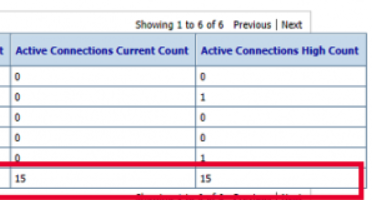
1 نقطةاذا نظرنا الى الصورة المرفقة سنجد ان عندنا Active Connections - Current Count Active Connections - High Count لعل هذا الرابط Answered question يفيدك عملية Increasing Weblogic Active Connections Increasing STACKOVERFLOW.COM I deployed my project to weblogic, and I realized I had connections not closed because weblogic server went to overload. I fixed them. But still I... لكنك سلمك الله تحتاج الى JDBC Data Source: Monitoring ايضا لهاتين القيمتين Active Connections Current Count و Active Connections High Count المرجع JDBC Data Source: Monitoring: Statistics DOCS.ORACLE.COM Oracle WebLogic Server 12.1.3.0 Documentation
 1 نقطة
 -
1 نقطةانا كان عندى نفس المشكلة واتضح ان السبب فى الكود المستخدم فى Login Button Bean, لانه حتى بعد خروج المستخدم النظام ال session تظل مفتوحة على JDBC ياريت تعرض الكود المستخدم فى Login Button Bean1 نقطة
-
السلام عليكم جميعا........... My friends there are two solutions to solve this problem... Solution(1): ----------------- you can work on the trigger KEY-ENTQUERY on the form (module) level or yo can use the trigger PRE-QUERY on the block level..where the block is the block is which you will query from. In these triggers you can use the DEFAULT_WHERE while you have to use coding. Solution(2): ----------------- You can use exeute query in the trigger (WHEN-BUTTON-PRESSED) Go_block('BLOCK_NAME'); EXECUTE_QUERY; in this case you have to go to the block property and type the where condition in the property in there and also you can use the name of the text itm in the canvas for the date you enter..... Regards... to you all....... These are simple concepts............for the search property of ORACLE....1 نقطة
